


Set the business boundary before the first live AI trial

An AI pilot should end with a decision, not simply keep running because everybody became used to it. This free card gives a director, process owner and staff member one visible record of what the trial may do, what it must not do and when its permission ends.
Use it before the first live case. Complete it with the person who owns the business result, keep the previous route available and review real evidence before deciding whether to continue, narrow, expand or retire the pilot.
Version 1.0, published 23 August 2026. No email address or form is required. This is an Ostina practical framework, not a compliance certificate, legal opinion or fixed pilot duration.
Download the one-page AI Pilot Card
Print it, write on it or use the eight headings in your own operating record. The PDF contains no form tracking and does not ask for personal information.
PDF, A4 portrait, one page. Free to use internally.Why an expiry date matters
A project plan may give the trial period an end date while the mailbox connection, account, shared folder or automated route remains active. If nobody has to make a decision, temporary access can quietly become part of normal operations.
The expiry date applies to the business permission, not merely the project diary. It creates a review point where a named person must decide what happens next. It is not a demand to switch off useful work arbitrarily; it is a requirement to renew the permission on purpose and with evidence.
If no review decision is recorded, the pilot does not silently expand or become permanent. Keep the previous route available until the owner has approved what follows.
Complete these eight fields
Intended business finish
Name the result people should see, not merely the AI feature. “Every suitable enquiry is recorded and assigned a dated next action” is clearer than “classify enquiries”.
Cases inside and outside scope
State the ordinary cases the pilot may handle and the exceptions that go straight to a person.
Accountable owner
Name the person who can approve, narrow, pause or retire the pilot. A department or “the AI team” is not an accountable owner.
Allowed information and access
List the approved mailbox, folders, records and tools, together with anything expressly excluded.
Actions the pilot may take
Separate reading and drafting from sending messages, changing shared records, moving money or making commercial promises.
Evidence to collect
Record useful completion, exceptions, human intervention, reliability and any staff or customer effect that can be observed responsibly.
Stop conditions
Define the events that pause the pilot immediately instead of waiting for the scheduled review.
Expiry date and reviewer
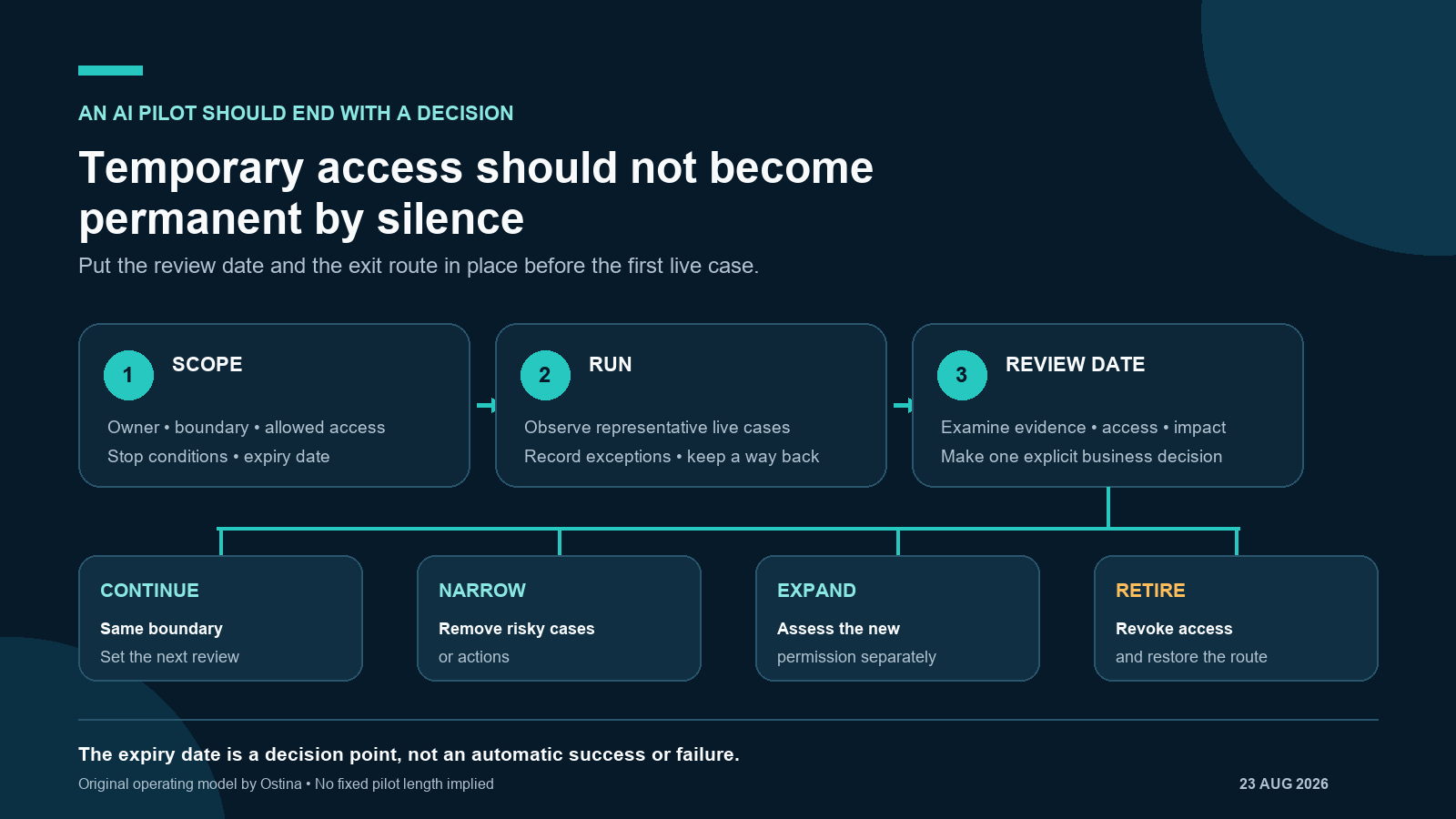
Set the date, decision owner and four available outcomes: continue, narrow, expand or retire.
Use the card in four steps
- Choose one workflow. Start with one repeated business result and keep the existing route available.
- Complete the card together. The business owner, process owner and staff who handle exceptions should be able to understand the same boundary.
- Run representative cases. Observe ordinary work and difficult exceptions without increasing access or actions during the test.
- Make an explicit decision. On the review date, continue, narrow, assess an expansion separately or retire the pilot and remove its access.
Worked example: incoming sales enquiries
This is an illustrative operating example, not a client case study or recommended universal duration.
| Card field | Illustrative entry |
|---|---|
| Finish | Every suitable enquiry is recorded, acknowledged after human review and assigned a dated next action. |
| Inside scope | Ordinary enquiries arriving in one approved inbox with the minimum information needed to create a draft record. |
| Outside scope | Complaints, contractual questions, sensitive information, missing details and unusual commitments. |
| Allowed actions | Read approved messages, extract basic details, prepare a draft record and draft an acknowledgement for a person to review. |
| Not allowed | Invent prices, promise delivery dates, send unapproved messages or attachments, or dismiss an unusual request without a person checking it. |
| Review | At the agreed date, compare real cases, interventions, failures and boundary breaches before choosing what happens next. |
Stop early when the boundary is no longer trustworthy
The scheduled review is not permission to continue through a serious problem. Proportionate stop conditions might include:
- an external message being sent without the required human approval;
- access to information outside the documented sources;
- a missing or unreliable activity record;
- repeated mismatches between a customer and the record being updated;
- a material supplier, model or connected-service change that invalidates the assessment; or
- the named owner no longer being available to oversee the trial.
These are operating examples, not a claim that every event creates the same legal, privacy or security risk. The appropriate control depends on autonomy, information, consequence and sector duties.
The review has four useful outcomes
Continue
Keep the same boundary, record the next review and continue monitoring. Approval is not permanent.
Narrow
Remove the cases, information or actions creating repeated problems while retaining the useful part.
Retire
Revoke accounts and access, remove scheduled jobs, restore the agreed route and record what was retained or removed.
Sources and practical boundary
The card is an Ostina operating recommendation rather than an official standard. Its structure is informed by current public guidance on bounded pilots, proportionate safeguards, monitoring, cease-use conditions, lifecycle review and data retention:
- UK National Cyber Security Centre: Thinking carefully before adopting agentic AI, published 15 May 2026.
- UK National Cyber Security Centre: Managing the cyber risk of agentic AI, published 20 August 2026.
- Department for Science, Innovation and Technology: AI Management Essentials tool, updated 6 February 2026.
- National Institute of Standards and Technology: AI Risk Management Framework Core.
- Information Commissioner's Office: storage limitation. The page currently states that it is under review following UK legislative change.
Frequently asked questions
Is the AI Pilot Card a compliance certificate?
No. It is a practical framework for recording a business operating boundary. It does not certify compliance, replace current official guidance or remove the need for legal or sector advice.
Does every AI pilot need to last 30 days?
No. The right period depends on case volume, consequence and how quickly representative exceptions appear. The important control is an explicit review date and decision owner.
What happens when the review date arrives?
The owner should choose to continue the same boundary, narrow risky cases or actions, assess an expansion separately, or retire the pilot and remove its access.
Can the card be used internally for free?
Yes. The PDF can be downloaded and used inside a business without submitting an email address or form.
The practical next step
Complete the card with the people who own and perform one recurring workflow. If the trigger, information boundary, approval point, stop condition or fallback is unclear, fix that before increasing autonomy. For the wider operating model, read Ostina's UK SME AI Workflow Evidence Hub and AI Control guidance.
